
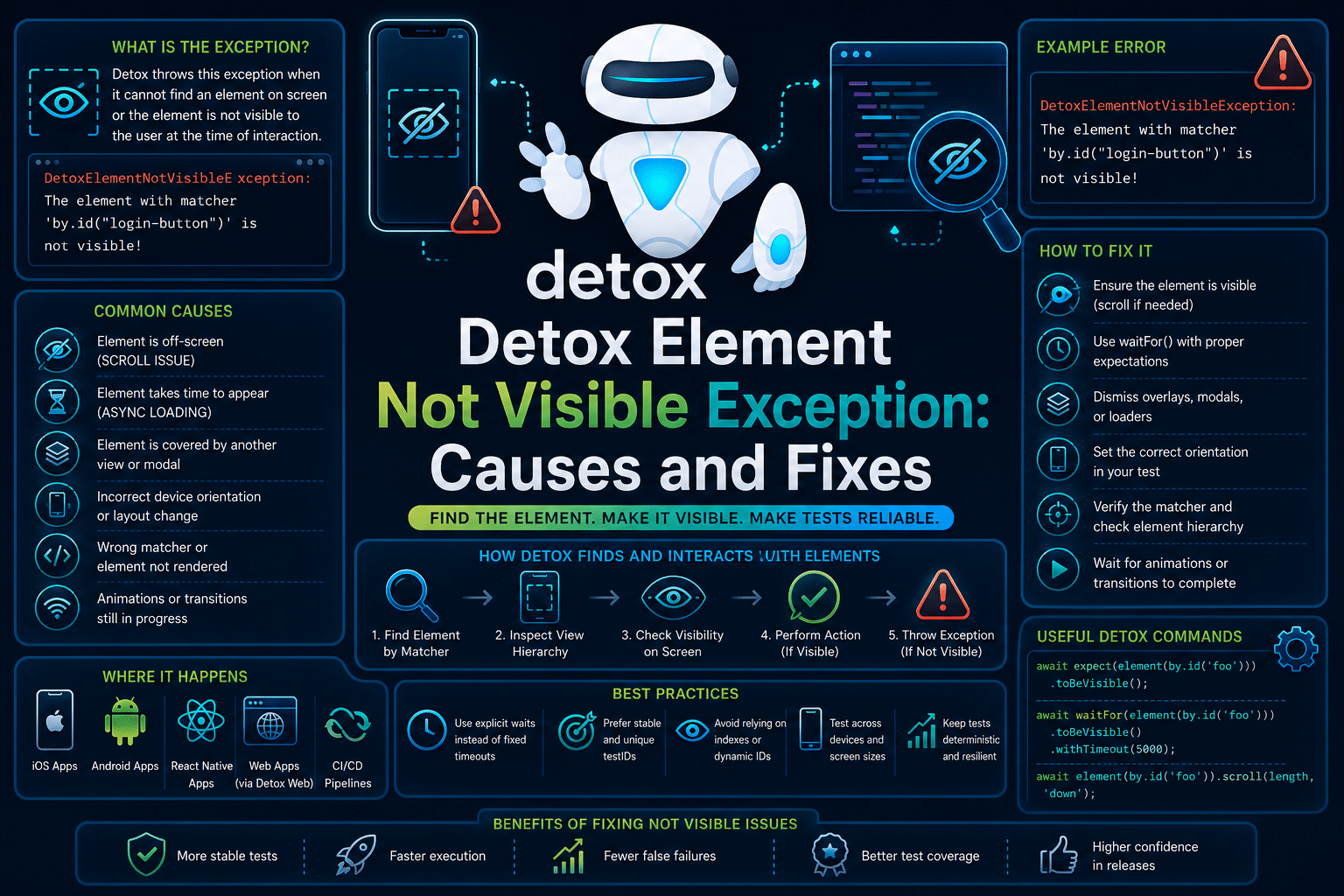

Detox Element Not Visible Exception in Detox is a runtime UI visibility failure.
If you are encountering it while testing Android or iOS applications with Detox, this guide covers the native mobile testing scenario, not Selenium’s ElementNotInteractableException or Appium’s visibility-related exceptions.
The error indicates that Detox located the target element but determined it was not sufficiently visible for interaction.
In most cases, the issue points to the application’s current UI state rather than an incorrect selector. It typically involves rendering, scrolling, animations, overlays, or timing between the test and the app.
What Is Detox Element Not Visible Exception?
A Detox Element Not Visible Exception occurs when a test attempts to interact with a visual element that exists in the view hierarchy but is not visible enough to satisfy Detox’s visibility requirements.
The framework validates that an element is actually visible on screen before allowing actions such as tap() or typeText().
The exception is usually thrown immediately before an interaction command executes. Detox synchronises with the application, waits for the app to become idle, and then performs a visibility check.
If the element is hidden, off screen, covered by another view, or only partially visible beyond the required threshold, the interaction fails.
This differs from a “Cannot Find Element” error, where Detox cannot locate the element at all.
It also differs from timeout errors, where the expected UI state never appears.
In this case, Detox successfully identifies the element but refuses to interact with it because it is not visible enough.
What Causes Detox Element Not Visible Exception?
Detox throws an Element Not Visible Exception when it successfully finds an element in the UI hierarchy but determines that it is not sufficiently visible for user interaction.
In most cases, the problem is not the selector itself but the application’s current UI state. The following are the most common causes, ordered from those encountered most frequently to less common edge cases.
1. The Element Is Outside The Visible Viewport
The most common reason is that the target element is inside a ScrollView, FlatList, or another scrollable container but is currently outside the visible area of the screen.
Although Detox can locate the element in the view hierarchy, it will not interact with it until enough of the element is visible.
This frequently occurs on long forms, settings screens, and list-based interfaces where users are expected to scroll before interacting.
2. The Screen Has Not Finished Rendering
Modern React Native applications often render content asynchronously after API calls, state updates, or lazy-loaded components.
If the test attempts to tap an element before rendering has completed, Detox may find the element while it is still hidden or only partially rendered.
This timing mismatch commonly appears on data-heavy screens or immediately after navigation.
3. Another UI Element Is Blocking The Target
Temporary UI components such as loading indicators, modal dialogs, bottom sheets, toast messages, permission prompts, or floating banners can prevent the target element from meeting Detox’s visibility requirements.
Even if the element is positioned correctly, Detox detects that another view is covering it and blocks the interaction to mimic real user behaviour.
4. Animations Or Screen Transitions Are Still In Progress
Navigation transitions, expanding panels, fade-in effects, and other UI animations can briefly place an element outside Detox’s required visibility threshold.
During these transitions, the element may exist in the hierarchy but not yet be considered fully visible.
This often results in intermittent failures that appear only under certain execution speeds or device performance conditions.
5. Platform-Specific Layout Differences
Android and iOS do not always render the same screen identically. Safe areas, status bars, keyboard behaviour, navigation components, and platform-specific styling can change where an element appears on the screen.
As a result, an interaction that succeeds immediately on one platform may fail on the other because the element initially starts outside the visible viewport.
How To Reproduce The Element Not Visible Exception Error in Detox?
A common way to reproduce the Detox Element Not Visible Exception is by attempting to interact with a control that exists in the visual hierarchy but is positioned below the visible portion of a scrollable screen.
In this example, the Place Order button is located further down a ScrollView. The test verifies that the checkout screen itself is visible but immediately attempts to tap the button without first scrolling or waiting for it to enter the viewport.
Since Detox requires the element to be sufficiently visible before performing any interaction, the tap operation fails even though the element can be located.
describe('Checkout', () => {
  it('places an order', async () => {
    await expect(element(by.id('checkoutScreen'))).toBeVisible();

    // The button exists but is below the visible area of the screen
    await element(by.id('placeOrderButton')).tap();
  });
});
The test produces an error similar to the following:
DetoxRuntimeError: The element with matcher (id == "placeOrderButton") is not visible and cannot be interacted with.This error indicates that Detox successfully found the element using the provided matcher but rejected the interaction because the button did not meet its visibility requirements at the time of the tap().
The failure typically occurs when the element is off screen, partially obscured, or temporarily hidden by the current UI state.
How To Fix Detox Element Not Visible Exception
1. Scroll The Element Into View First
The most common solution is to scroll until the target element becomes visible before attempting any interaction. Detox only allows interactions with elements that meet its visibility threshold.
This approach is especially important for long forms, settings pages, and list-based interfaces where items are rendered outside the initial viewport.
await waitFor(element(by.id('placeOrderButton')))
  .toBeVisible()
  .whileElement(by.id('checkoutScrollView'))
  .scroll(200, 'down');

await element(by.id('placeOrderButton')).tap();
2. Wait For The UI To Finish Rendering
If the screen depends on network requests or asynchronous rendering, wait explicitly until the element becomes visible instead of interacting immediately.
Using waitFor() reduces failures caused by rendering delays without relying on arbitrary sleep statements.
await waitFor(element(by.id('submitButton')))
  .toBeVisible()
  .withTimeout(5000);

await element(by.id('submitButton')).tap();
3. Dismiss Blocking UI Elements
Temporary overlays such as loading spinners, modals, permission dialogs, or banners can prevent an otherwise visible element from passing Detox’s visibility checks.
Ensure these transient views disappear before continuing with the interaction.
await waitFor(element(by.id('loadingSpinner')))
  .toBeNotVisible()
  .withTimeout(5000);

await element(by.id('submitButton')).tap();
4. Reduce Animation-Related Failures
Animated transitions can briefly place UI elements outside Detox’s required visibility threshold. Disabling animations during testing produces more consistent execution across devices.
This is particularly helpful when navigation transitions or expanding panels are involved.
beforeAll(async () => {
  await device.launchApp({
    newInstance: true,
    launchArgs: {
      DETOX_DISABLE_ANIMATIONS: '1'
    }
  });
});
5. Verify Platform-Specific Layout Differences
React Native layouts sometimes differ between Android and iOS because of safe areas, navigation bars, keyboard handling, or platform-specific styling.
A button that appears immediately on Android may initially be below the fold on iOS.
Verify the screen layout on both platforms and adjust scrolling or visibility checks where necessary.
if (device.getPlatform() === 'ios') {
  await element(by.id('checkoutScrollView')).scroll(250, 'down');
}

await element(by.id('placeOrderButton')).tap();
How AI Can Help You Fix Detox Element Not Visible Exception Faster
When this exception appears, engineers typically inspect screenshots, replay failed CI runs, compare local executions, verify scroll positions, review animations, and repeatedly rerun the same test until the UI reaches the expected state.
Much of the debugging time is spent identifying whether the problem is caused by the test, the application, or an unexpected UI transition.
An AI-assisted review layer can analyse the test before execution and identify interaction patterns that commonly trigger visibility failures.
It can detect taps performed immediately after navigation, missing scroll operations before interacting with list items, absent visibility assertions, or interactions with elements that frequently appear beneath loading overlays.
Detox tells you that an element was not visible when the interaction was attempted. A code review layer can identify risky interaction patterns before the test ever executes.
While Detox surfaces the failure at runtime, Panto AI’s mobile QA and code review layer can flag the underlying missing visibility checks, scrolling logic, or unsafe interaction sequences earlier in the workflow and directly in the pull request.
The value is not in replacing Detox. The value is in catching visibility-related test defects before they become repeated CI failures, longer debugging sessions, and unstable test suites.
Best Practices To Prevent Detox Element Not Visible Exception
Most instances of the Detox Element Not Visible Exception can be avoided by designing tests that account for how users actually interact with the application and how React Native renders the UI.
Rather than relying on ideal execution timing, build tests that accommodate rendering delays, scrolling behaviour, and platform-specific layouts.
The following practices help reduce visibility-related failures and improve test stability across both local and CI environments.
1. Use Stable Screen States
Always begin user interactions only after the target screen has fully loaded and reached its expected state.
Waiting for key UI elements to become visible before performing actions prevents failures caused by incomplete rendering, pending network requests, or navigation transitions that temporarily hide interactive controls.
2. Design Tests Around Real User Navigation
Write tests that follow the same sequence of interactions a real user would perform instead of assuming every control is immediately accessible.
If a user would need to scroll, dismiss a modal, or navigate through multiple screens before reaching a button, your test should do the same to ensure the element is genuinely visible before interaction.
3. Keep Scrollable Content Predictable
Structure long forms, lists, and scrollable screens consistently across devices and screen sizes so important controls appear in expected locations.
Predictable layouts reduce the likelihood of elements being unexpectedly positioned outside the viewport, making visibility checks and scrolling behaviour more reliable.
4. Minimise Test-Time Animations
Configure automated test environments to minimise or disable unnecessary UI animations wherever possible.
Navigation transitions, expanding panels, and animated layout updates can briefly place elements outside Detox’s visibility threshold, leading to intermittent failures that are difficult to reproduce consistently.
5. Use Stable Test Identifiers
Assign unique and consistent testID values to all interactive elements instead of relying on text labels or view hierarchy.
Although stable identifiers do not guarantee an element is visible, they eliminate selector ambiguity and make it much easier to determine whether a failure is caused by visibility, timing, or an incorrect locator.
6. Test Across Both Android And iOS Early
Validate visibility-dependent interactions on both platforms during development rather than waiting until CI.
Differences in safe areas, navigation bars, keyboard behaviour, and screen layouts can change an element’s initial position, causing a test that performs well on one platform, only to fail with a visibility exception on the other.
Handling Detox Element Not Visible Exception In CI/CD Pipelines
Visibility failures often appear more frequently in CI than on local machines because cloud runners are slower, virtual devices render differently, and application startup takes longer.
Minor timing differences can expose rendering delays that are difficult to reproduce locally.
Shared CI infrastructure may also introduce inconsistent animation timing, delayed network responses, or slower screen rendering.
Tests that assume immediate visibility often become flaky under these conditions.
adb shell settings put global window_animation_scale 0
adb shell settings put global transition_animation_scale 0
adb shell settings put global animator_duration_scale 0

detox test --configuration android.emu.release
Disabling unnecessary animations and validating the execution environment before running tests helps reduce visibility-related failures in automated pipelines.
Conclusion
Detox Element Not Visible Exception is a runtime interaction failure that indicates the target element exists but is not sufficiently visible for user interaction.
It usually points to UI state, rendering, scrolling, or layout issues rather than incorrect selectors.
The fastest debugging sequence is to verify the current screen state, confirm whether the element is off screen, inspect overlays or animations, and add explicit visibility or scrolling logic where appropriate before interacting.
For larger teams, the objective is not simply fixing individual failures. It is identifying recurring visibility patterns early so tests remain reliable across devices, operating systems, and CI environments.
Tools like Panto AI can help identify visibility-related test patterns during code review, reducing the likelihood of these runtime failures reaching your CI pipeline.
FAQs
Q: Why does Detox say an element is not visible even though it exists?
A: Because visibility and existence are different. An element may exist in the view hierarchy but still be outside the viewport, covered by another view, hidden by an animation, or only partially visible. Detox requires an element to meet its visibility threshold before it can interact with it.
Q: Why does Detox Element Not Visible Exception occur in CI but not locally?
A: CI environments typically run on slower hardware with different screen configurations and startup timings than local machines. These differences can expose rendering delays, scrolling issues, and race conditions that rarely appear during local testing.
Q: What is the difference between Detox Element Not Visible Exception and Cannot Find Element?
A: Cannot Find Element means Detox could not locate the element in the UI hierarchy. Element Not Visible means the element was found successfully but did not meet the visibility requirements needed for interaction.
Q: Can Android and iOS affect this exception?
A: Yes. Android and iOS render layouts differently, with variations in safe areas, navigation bars, keyboards, screen sizes, and scrolling behavior. An element that is immediately visible on one platform may require scrolling or waiting on the other.