

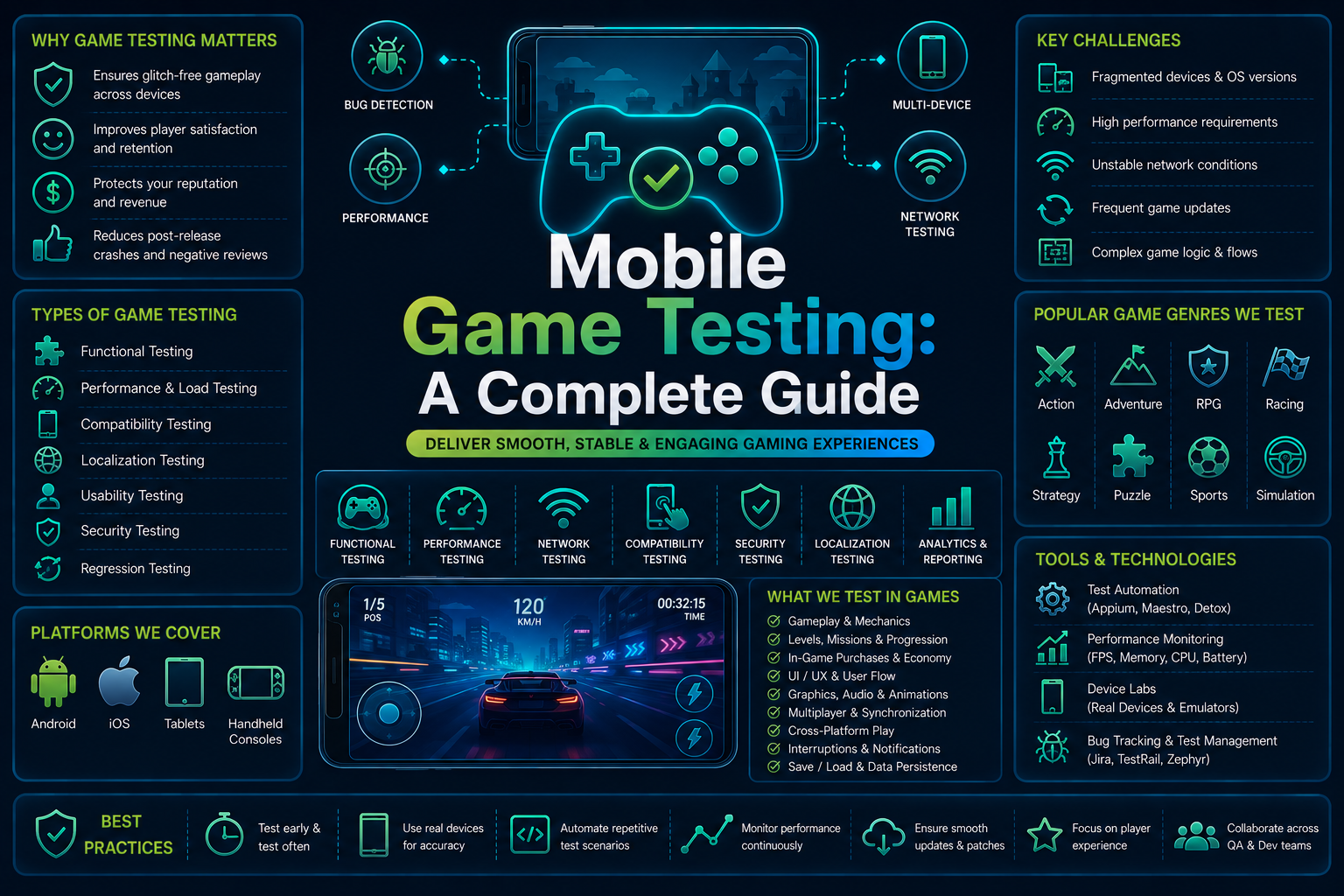

Mobile gaming is the largest slice of the games industry by a wide margin.
Sensor Tower’s State of Gaming 2026 report puts mobile in-app purchase revenue at roughly $82 billion in 2025, with about 3 billion people playing mobile games worldwide according to Newzoo.
That scale means a single bad build, a crash on a popular device, or a broken purchase flow does not just annoy a handful of users. It shows up in retention charts and revenue within hours.
This guide covers what mobile game testing involves, how it differs from testing a standard business app, the seven areas every gaming QA strategy needs to cover, how priorities shift by genre, and which parts can realistically be automated versus which still need a human playing the game.
What Is Mobile Game Testing?
Mobile game testing is the process of verifying a mobile game across functional correctness, visual quality, performance, device compatibility, network behavior, security, and player experience, both before launch and continuously after release.
For studios looking to automate repetitive game QA workflows, gaming QA automation can help validate critical gameplay-adjacent flows across mobile devices.
It applies to games built on Unity, Unreal Engine, Godot, and custom engines, running on Android and iOS.
It sits alongside, but is distinct from, general mobile app testing.
A banking app and a mobile game share a platform, but almost nothing about how they render, respond to input, or fail.
Live-service and free-to-play titles also ship content patches on a weekly or biweekly cadence, so testing is a continuous process, not a one-time pre-launch event.
Absolutely. I’d expand this by making each difference explain why it changes the testing strategy, rather than just listing the differences.
Why Gaming Apps Need a Different Testing Approach
Standard mobile apps use native UI components that automation tools can see and interact with individually through the accessibility tree.
Games render their entire interface through a graphics engine onto a single canvas. A tool inspecting a Unity or Unreal game typically sees one surface view, not a button called “Play.”
Several other characteristics make game testing fundamentally different:
- Canvas-based interfaces: Game engines often render UI as a single surface, making traditional element-based locators ineffective.
- Complex touch input: Games require multi-touch, swipes, drags, long presses, virtual joysticks, and precisely timed gesture sequences.
- Input timing: Delays between player input and in-game response can directly affect gameplay and become functional defects.
- Physics and randomness: Physics engines, AI, and procedural generation can produce different outcomes across test runs.
- Procedural content: Dynamically generated levels, enemies, and environments create a huge number of states that cannot be covered by fixed test paths alone.
- Frame rate: FPS drops, frame-time spikes, and rendering stutters can directly impact gameplay and must be tested as functional quality issues.
- Input latency: The time between a touch and the resulting action matters significantly for fast-paced gameplay.
- Complex game states: Health, inventory, progression, enemies, timers, abilities, and checkpoints can interact to create thousands of possible states.
- Combinatorial player paths: Player choices and branching gameplay create far more possible journeys than the predictable flows of standard apps.
- Visual correctness: Animations, HUDs, effects, camera movement, textures, and scene transitions require visual validation beyond traditional UI assertions.
- Audio behavior: Sound effects, music, voice lines, and audio cues can be gameplay-critical and need validation alongside visual behavior.
- Sustained performance: Long sessions can expose memory leaks, thermal throttling, FPS degradation, crashes, and excessive battery consumption.
- Device fragmentation: Differences in GPUs, refresh rates, screen sizes, memory, and touch sampling can produce device-specific gameplay issues.
- Network conditions: Multiplayer games must handle latency, packet loss, disconnections, bandwidth changes, and reconnection during active gameplay.
- Interruption recovery: Tests need to verify that games correctly recover after backgrounding, calls, screen locks, crashes, or temporary connectivity loss.
- Save and progression data: Updates can corrupt inventories, currencies, achievements, checkpoints, or other player progress if migration is not tested.
The result is that game testing cannot rely solely on traditional automation.
A robust strategy usually combines visual interaction, gesture and input simulation, engine-level instrumentation, performance monitoring, network testing, deterministic test states, and real-device coverage.
The goal is not simply to verify that a player can tap through a flow, but to verify that the game responds correctly under the wide range of inputs, states, devices, and runtime conditions that real gameplay produces.
The 7 Types of Mobile Game Testing
1. Functional Testing
Functional testing verifies game mechanics, menus, progression, and save or load functionality.
That includes score and level logic, currency and reward systems, and progress persisting correctly across sessions and device restarts.
In-app purchase flows deserve their own line item.
Payment completion, receipt validation, and item delivery need checking on every build, since a broken purchase flow is one of the fastest ways to generate refund requests and one-star reviews.
Tutorial flows matter just as much, since a confusing first session is the most common reason players uninstall before a game gets a fair chance.
2. Compatibility Testing
Compatibility testing confirms the game runs correctly across screen sizes, aspect ratios, chipsets, OS versions, and RAM tiers.
Start with the top 20 to 30 devices based on your own install data, then expand toward 50 or more for larger titles.
Real devices matter more here than for most business apps, since GPU rendering behaves differently on emulators than on physical hardware, which is exactly the kind of coverage device farms for mobile testing are built to solve at scale.
3. Performance Testing
Performance testing measures frame rate, memory, CPU and GPU load, battery drain, thermal throttling, and load times during actual gameplay, not just app startup.
Memory leaks that only surface after 20 or more minutes of continuous play are a common culprit behind post-launch crash spikes.
Sustained FPS during intensive scenes, not just average FPS, is the metric that correlates with player complaints.
A game averaging 55fps that drops to 20fps during a crowded lobby will draw more complaints than one holding a steady 45fps throughout.
The broader discipline of mobile app performance testing tools covers the profiling approach underneath, though game-specific tools add FPS and frame-stability benchmarking on top.
4. Network Testing
Network testing validates behavior under weak WiFi, intermittent cellular data, mid-session connection drops, and full offline states.
This matters most for live-service and multiplayer titles, where a dropped connection during a match can cost a player their progress.
Script these scenarios deliberately: latency above 200ms, packet loss in the 5 to 15 percent range, mid-session drops, and resynchronization after reconnecting.
For real-time multiplayer, test what happens when one client desyncs from the authoritative server state.
Games that fail gracefully show a reconnect prompt; games that fail badly let players see contradictory game states.
5. Usability and Playability Testing
This is the one category no tool fully replaces.
Control responsiveness, difficulty curve fairness, and whether the game is actually fun are subjective judgments that require a human playing the build, not a script asserting element states.
Pair structured playtesting with target-audience players against analytics such as session length and drop-off points.
Sensor Tower’s 2026 data shows average day-7 retention for top casual games sitting around 15 percent, a useful external benchmark.
Cohort testing across several sessions, not just one sitting, catches difficulty spikes that only frustrate players on their fifth or sixth attempt.
6. Security Testing
Security testing protects against memory editors and modded APKs, data tampering, payment fraud, and account exploitation.
Server-side validation of game state matters more here than in most apps, since a client that trusts its own local values is trivially cheatable.
Any currency, inventory, or ranking value living client-side without a server check is a standing invitation to modify it, and leaderboards need particular scrutiny since a single publicized cheating exploit damages trust fast.
7. Localization Testing
Localization testing checks that translated text fits UI elements across every supported language, that date, currency, and unit formats are correct per region, and that right-to-left languages render properly.
Text overflow is the most common localization bug, since UI is often sized for English and breaks under longer translations.
Pricing tiers should reflect local purchasing power rather than a flat currency conversion.
Store Compliance and Certification Testing
Store compliance testing verifies the build meets before submission.
Accurate metadata and screenshots, correct age ratings, working privacy disclosures, and a functioning restore-purchases flow, which both stores require and frequently reject apps for missing.
Misleading store metadata is one of the fastest paths to a rejected submission, so building a compliance pass into your pre-submission checklist avoids losing days to an avoidable rejection.
What Tools Are Used for Mobile Game Testing
No single tool covers every category above, which is why most studios run a stack rather than one platform.
Native and hybrid UI automation handles the menus, shop, login, and onboarding flows sitting around the game engine’s canvas, the layer standard cross-platform mobile automation platforms operate on regardless of what engine renders the gameplay itself.
Engine-level instrumentation, exposed by Unity and Unreal’s own testing frameworks, can interact with in-game objects directly, at the cost of requiring an instrumented build rather than the exact binary players download.
Device farms and real device clouds provide the hardware breadth no in-house lab can match cost-effectively, and comparing real device cloud testing tools against your specific compatibility matrix is worth doing before committing to a provider.
Dedicated security and network simulation tools round out the stack, run less frequently but essential before major launches.
How Testing Priorities Shift by Genre
- Casual and hyper-casual: prioritize compatibility on low-end devices and fast load times, since this audience churns within seconds of friction.
- Puzzle and mid-core single player: prioritize progression logic, save integrity, and difficulty pacing.
- Real-time multiplayer and competitive: prioritize network resilience, anti-cheat, and performance under crowded scenes.
- Live-service and gacha-style: prioritize purchase flow testing and regression on every content patch.
- Casino-style and real-money gaming: prioritize security and regional compliance, the strictest requirements of any mobile game genre.
What Can Actually Be Automated in Game Testing
Automation earns its keep on repetitive, high-volume work: menu and UI flows, purchase regression on every build, scripted tutorial paths, save and load verification, performance benchmarking, and smoke testing across a device matrix.
What still requires manual playtesting: gameplay feel and balance, difficulty evaluation, subjective visual quality, and real-time multiplayer synchronization.
Native UI layers around the game, system permission dialogs, login screens, account linking, are where standard mobile automation platforms are strongest.
That layer is where cross-platform mobile automation adds value without requiring engine-level instrumentation, since automated Android app testing and iOS app testing automation both operate there regardless of what engine renders the canvas underneath.
Games with a React Native or Flutter shell around native game views, common in hybrid casual titles, benefit directly from React Native automated testing and Flutter app testing for everything outside the core gameplay canvas.
Common Bugs in game Testing Worth Testing For Early
- Network and sync failures: High latency, packet loss, or temporary disconnections can cause players to lose progress, see outdated game states, duplicate actions, or become desynchronized from other players in multiplayer sessions.
- Interruption bugs: Calls, notifications, screen locks, or app switching can interrupt gameplay and cause the game to freeze, lose progress, reset the current state, or fail to resume correctly.
- Texture pop-in: Asset streaming can fall behind player movement, causing textures, models, or environmental objects to appear late or at low quality, particularly on lower-RAM devices.
- Save corruption: Force-closing the game during a save or losing connectivity during cloud synchronization can corrupt progress, overwrite newer data, or prevent saved states from loading.
- Receipt validation failures: A payment may succeed through the app store while the game fails to validate the receipt or grant the purchased item, creating a high-severity issue that directly affects revenue.
- Frame-rate drops: Intensive scenes, particle effects, or large numbers of active objects can cause sudden FPS drops and frame-time spikes that make controls feel delayed or gameplay visibly stutter.
- Input registration failures: Rapid taps, simultaneous touches, swipes, or gesture sequences may be missed or incorrectly interpreted, causing attacks, movement, abilities, or other player actions to fail.
- Device-specific rendering bugs: Differences in GPU, screen resolution, aspect ratio, refresh rate, or OS version can cause stretched UI, misplaced HUD elements, visual artifacts, or incorrectly rendered game assets.
How Many Devices Should You Test On
Start with the top 20 to 30 devices based on actual player install data, not a generic list, covering chipset spread, RAM tiers, and aspect ratios including foldables.
Keep both current-generation and two to three year old devices in rotation, since older hardware is often where your real player base sits.
Comparing cross-platform testing tools against your specific matrix is worth doing before committing to a device farm provider.
A Layered Mobile Game Testing Strategy
- Smoke tests on every build: does the game launch and respond to input across a representative device set
- Automated regression, nightly or per pull request: menu, purchase, and account flows against the native and hybrid UI layer
- Performance regression: FPS, memory, and load times benchmarked against the previous build
- Manual playtesting before major releases: feel, balance, and anything visual an assertion cannot evaluate
- Security and network testing before launches: anti-cheat validation and network condition simulation
Visual regression checks belong in that second layer too. A HUD element that silently shifts a few pixels after a UI update is exactly what visual regression testing is designed to catch before a player screenshots it for a one-star review.
Key mobile Game Testing Metrics to Track After Launch
Testing does not end at launch, and the metrics that matter shift from pass or fail results to trend lines.
A build can pass every pre-launch check and still reveal problems once it meets real devices, real networks, and real player behavior at scale, so the dashboard you watch in the weeks after release matters as much as the checklist you ran before it.
Crash-free session rate and ANR, application not responding, rate are the clearest technical health signals, and both should be monitored per device tier and per OS version rather than as a single blended average.
A healthy overall number can hide a serious problem on one specific chipset or Android version, and that hidden problem is usually concentrated among the players least likely to tolerate it.
Day 1, day 7, and day 30 retention track player experience quality over time, and a sharp drop at any one of those checkpoints usually points to a specific, findable cause rather than a vague quality problem.
Day 1 drop-off points to tutorial or onboarding friction, day 7 drop-off points to content pacing or difficulty curve issues, and day 30 drop-off points to endgame content or live-ops cadence running dry.
Treating retention as one number instead of three separate diagnostic checkpoints is one of the most common mistakes studios make when reading their own post-launch data.
FPS stability and monetization health round out the picture, since a technically stable game that runs poorly during its most intense moments, or one that quietly leaks revenue through a broken purchase step, will show the damage in retention and revenue charts before anyone files a bug report.
- Crash-free session rate: the percentage of sessions that complete without a crash, tracked per device tier and OS version, not as one blended figure. A 99% overall rate can still mean a 90% rate on a specific budget chipset that represents a meaningful share of your install base.
- ANR rate: how often the app freezes or becomes unresponsive without fully crashing, common during asset loading or network calls on the main thread. ANRs are easy to miss in QA because the app eventually recovers, but they erode trust just as much as a hard crash.
- Day 1, day 7, and day 30 retention: the share of players who return on each of those specific days, read as three separate diagnostics rather than one trend line, each pointing to a different stage of the player experience.
- FPS stability percentage: the share of frames rendered within your target budget, not average FPS. A game that averages 50fps but spends a third of its frames below 30fps during combat will feel far worse than the average suggests.
- Median load and transition time: time from cold start to playable, and between major scene transitions, tracked separately since a slow initial load and a slow level transition point to different underlying causes.
- Average session length and sessions per day: a drop in either, even with retention holding steady, often signals a pacing or friction issue that has not yet shown up as churn.
- Purchase conversion and failed transaction rate: the share of initiated purchases that complete successfully. A rising failure rate is frequently a QA issue, such as a receipt validation timeout, rather than a player behavior change, and it is one of the fastest metrics to act on since it directly costs revenue.
Conclusion
Mobile game testing borrows its vocabulary from general app testing, functional, compatibility, performance, security, but the mechanics underneath are genuinely different.
Canvas rendering, gesture complexity, and non-deterministic outcomes mean a strategy copied directly from a business app will miss the bugs that actually cost games their ratings and their retention.
The teams that hold up best treat it as a layered problem calibrated to their genre: automate the repetitive native and hybrid UI layer aggressively, benchmark performance on every build, and protect dedicated time for human playtesting where no tool can substitute for judgment.
Get the automatable layer right with a platform built for cross-platform mobile automation, and your team’s playtesting time goes toward gameplay feel instead of regression chores.
FAQs
Q: Can standard mobile automation tools test Unity or Unreal games?
A: Standard mobile automation tools can interact with native UI elements around a game, such as login screens, permissions, and system dialogs, but they generally cannot inspect objects rendered inside a Unity or Unreal Engine canvas. Testing in-game elements and gameplay interactions typically requires engine-specific instrumentation or testing tools.
Q: What is the difference between game testing and game QA?
A: Game testing focuses on executing test cases, validating gameplay, and identifying defects. Game QA is the broader quality discipline that includes test planning, risk assessment, coverage analysis, tooling, defect management, and quality metrics. Testing is one component of the overall QA process.
Q: What does poor testing cost a mobile game?
A: Poor testing can lead to crashes, broken purchases, negative reviews, player churn, and lost revenue. For live-service games, untested updates can also introduce regressions that affect active players immediately, making reliable regression testing particularly important before each release.
Q: Should I test mobile games on real devices or emulators?
A: Use both, but prioritize real devices for performance, graphics, battery usage, thermal behavior, and hardware-specific testing. Emulators are useful for early functional testing and broad coverage, but they cannot fully reproduce the GPU, thermal, sensor, and performance characteristics of physical devices.
Q: What should mobile game testing cover beyond functional testing?
A: A comprehensive mobile game testing strategy should cover performance, frame rate, memory usage, battery consumption, graphics rendering, network conditions, device compatibility, interruptions, in-app purchases, save states, and multiplayer or connectivity behavior. These areas are critical because a game can be functionally correct while still delivering a poor player experience.