

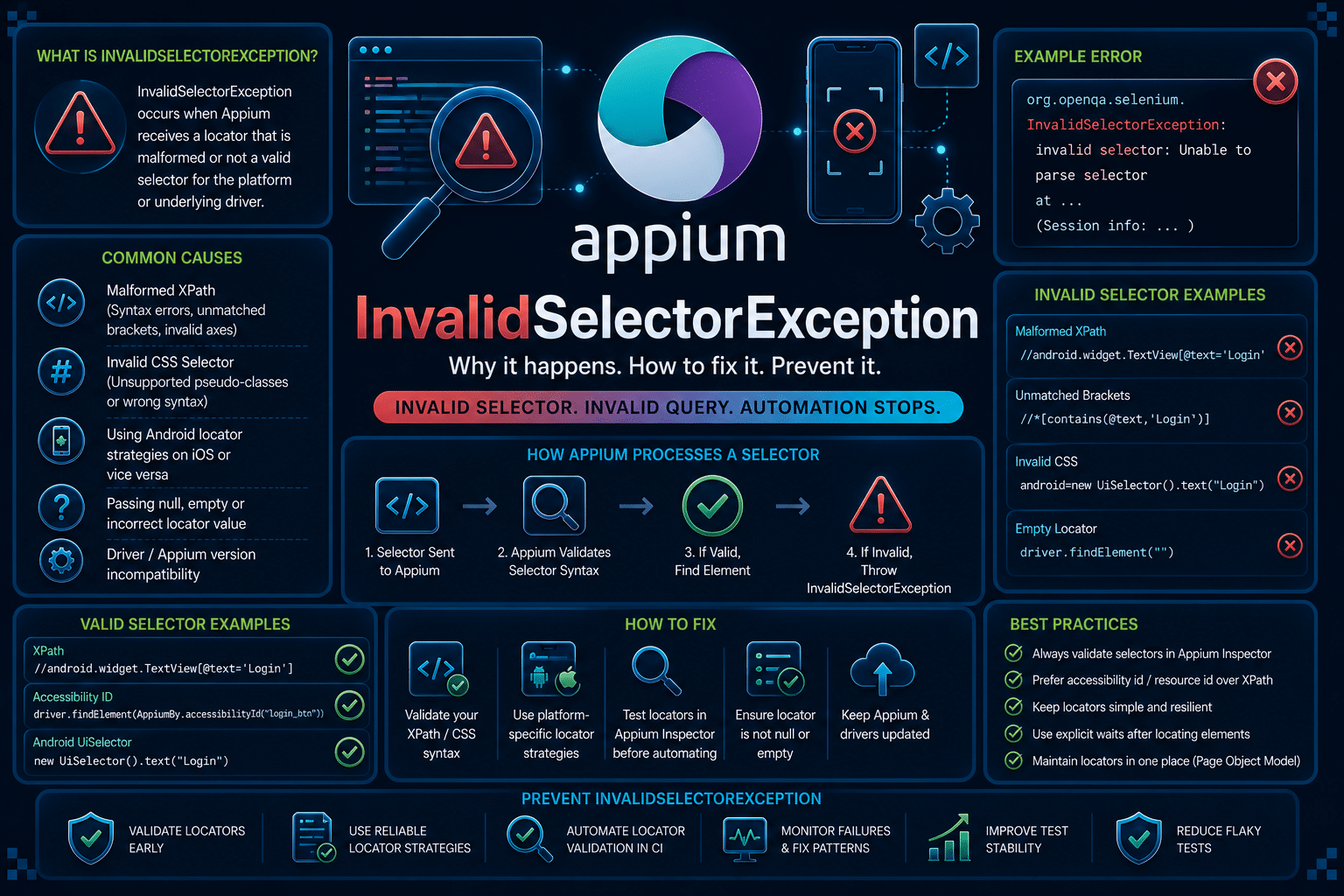

Appium InvalidSelectorException is a locator parsing failure. If you are seeing it while running Android (UiAutomator2) or iOS (XCUITest) tests, this guide covers the Appium-specific error, not the Selenium browser version.
The exception indicates that Appium received a selector it could not parse or execute. In most cases, the problem is the locator strategy, selector syntax, or a platform-specific selector being used against the wrong driver rather than the application itself.
What Is The Appium InvalidSelectorException Error?
InvalidSelectorException occurs when Appium cannot interpret the selector passed to a findElement or findElements call. Instead of searching the UI hierarchy, the driver rejects the locator because its syntax or strategy is invalid.
The exception is raised during element lookup, before Appium attempts any interaction such as clicking or typing. This makes it different from errors where a valid locator simply fails to find a matching element.
It is commonly confused with NoSuchElementException. The difference is that NoSuchElementException means the selector is valid but matches nothing, while InvalidSelectorException means the selector itself cannot be parsed or executed.
Android and iOS can surface this differently. UiAutomator2 validates Android UIAutomator expressions, while XCUITest validates iOS predicate strings and class chains using Apple APIs.
What Causes the Appium InvalidSelectorException Error?
A valid locator is not enough for Appium. The selector must also match the syntax and capabilities of the underlying automation driver.
InvalidSelectorException is raised when Appium cannot parse or execute the locator before searching the UI hierarchy. The following are the most common reasons this happens.
- Malformed selector syntax: The most frequent cause is an incorrectly formatted selector. Missing quotation marks, unmatched parentheses, invalid XPath expressions, or malformed iOS predicate strings prevent Appium from parsing the locator.
Since the selector is syntactically invalid, the driver rejects it before attempting to locate any element. - Using the wrong locator strategy for the platform: Android and iOS use different native automation engines and locator strategies. Android’s UiAutomator2 supports UIAutomator selectors, while iOS’s XCUITest supports NSPredicate strings and class chains.
Passing an Android-specific selector to XCUITest, or an iOS-specific selector to UiAutomator2, results in anInvalidSelectorExceptionbecause the driver does not recognize that selector language. - Unsupported locator strategy or driver version: Not every Appium driver or client version supports every locator strategy. If your Appium server, UiAutomator2/XCUITest driver, or client library is outdated or incompatible, a selector that works in another environment may be rejected as invalid.
This is particularly common after upgrading only part of the Appium stack. - Incorrectly generated dynamic selectors: Many test frameworks build selectors dynamically using variables or string interpolation.
If user input is not escaped correctly or special characters are inserted into the locator, the generated selector may become syntactically invalid even though the template itself is correct.
Logging the final selector often reveals these issues immediately. - Changes after framework or application updates: Upgrading Appium, switching platform drivers, or changes in the application’s accessibility attributes can expose selector problems that previously went unnoticed.
A locator that relied on deprecated syntax or older driver behavior may start throwingInvalidSelectorExceptionafter the update, even if the test code has not changed.
How To Reproduce The Appium InvalidSelectorException Error
InvalidSelectorException can be reproduced by passing a syntactically invalid locator to Appium during element lookup.
In the example below, the Android test uses a UIAutomator selector with a missing closing quotation mark.
When findElement() is executed, UiAutomator2 attempts to parse the selector, detects the malformed expression, and immediately throws InvalidSelectorException instead of searching for the element.
The same behavior occurs on iOS when an invalid NSPredicate or class chain expression is passed to the XCUITest driver.
MobileElement loginButton = driver.findElement(
    AppiumBy.androidUIAutomator(
        "new UiSelector().text(\"Login)"
    )
);
The test fails with an error similar to the following:
org.openqa.selenium.InvalidSelectorException:
Could not parse selector expression:
new UiSelector().text("Login)
Notice that the exception occurs before Appium interacts with the application. The driver rejects the locator because it cannot parse the selector, making this a selector validation error rather than an element lookup failure.
How To Fix The Appium InvalidSelectorException Error
1. Validate Selector Syntax
The first step is verifying that the selector is syntactically correct. Even a single missing quote or bracket causes the driver to reject the locator before searching the UI.
When using Android UIAutomator, ensure the Java expression is valid. For iOS predicates, confirm the predicate follows Apple’s NSPredicate syntax.
MobileElement loginButton = driver.findElement(
    AppiumBy.androidUIAutomator(
        "new UiSelector().text(\"Login\")"
    )
);
2. Use Platform-Specific Locator Strategies
Android and iOS support different native selector engines. Running an Android selector on XCUITest or an iOS predicate on UiAutomator2 results in an invalid selector.
Keep platform-specific locators separate instead of sharing them across both platforms.
if (platform.equals("Android")) {
    driver.findElement(
        AppiumBy.androidUIAutomator(
            "new UiSelector().resourceId(\"com.demo:id/login\")"
        )
    );
} else {
    driver.findElement(
        AppiumBy.iOSNsPredicateString(
            "name == 'Login'"
        )
    );
}
3. Verify Dynamically Built Selectors
Applications often build selectors using variables. Incorrect escaping or unexpected input can generate invalid expressions that are difficult to spot during code review.
Log the final selector before executing it so you can verify the exact string Appium receives.
String text = "Login";
String selector = String.format(
    "new UiSelector().text(\"%s\")",
    text
);

System.out.println(selector);
driver.findElement(AppiumBy.androidUIAutomator(selector));
4. Match Selector Support With Driver Versions
Some locator strategies depend on specific Appium and driver versions. If the selector is valid but consistently rejected after an upgrade, verify compatibility between the Appium server, UiAutomator2 or XCUITest driver, and client library.
Updating drivers together is generally safer than mixing significantly different versions.
appium driver list
appium driver update uiautomator2
appium driver update xcuitest
How AI Can Help You Fix Appium InvalidSelectorException Faster
The traditional debugging loop usually starts after the test fails. Engineers inspect Appium logs, review the generated selector, compare it with the application hierarchy, and repeatedly rerun the test until the locator becomes valid.
Most of the time is spent waiting for another execution rather than making the actual fix.
An AI-assisted review layer can inspect locator strings before execution. It can identify malformed UIAutomator expressions, invalid iOS predicates, incorrect escaping, and platform-specific locator mismatches during code review.
Appium tells you the selector is invalid after the element lookup fails at runtime. A code review layer can identify malformed locator expressions and unsupported selector patterns before the test is executed.
While Appium surfaces the failure at runtime, Panto AI’s mobile QA and code review layer can flag malformed locator expressions and platform-specific selector mismatches earlier in the workflow and directly in the pull request.
The value is not in replacing Appium. The value is in catching invalid locator definitions before they become failed test runs, repeated debugging sessions, and delayed CI feedback.
Best Practices To Prevent Appium InvalidSelectorException
Most InvalidSelectorException errors are preventable with consistent locator design and validation practices.
Since the exception is caused by invalid or unsupported selectors rather than application behavior, the goal is to catch locator issues before they reach runtime.
The following practices help reduce selector-related failures across both Android and iOS test suites.
- Standardize locator strategies across the project. Define approved locator strategies for each platform and use them consistently throughout the test suite. This minimizes inconsistent selector syntax and prevents engineers from introducing unsupported locator formats.
- Keep Android and iOS locators separate. Store platform-specific locators in dedicated page objects or locator classes instead of sharing them across platforms. This prevents Android UIAutomator selectors from being executed by XCUITest and iOS predicates from reaching UiAutomator2.
- Validate dynamically generated selectors. If selectors are built using variables or string interpolation, log or validate the final expression before passing it to Appium. This helps identify malformed strings, incorrect escaping, and unexpected characters before test execution.
- Review locator changes during code review. Treat locator updates as production code rather than simple test data. Verifying selector syntax and platform compatibility during pull requests helps catch parsing errors before they are introduced into the test suite.
- Keep Appium and driver versions aligned. Use consistent versions of the Appium server, client libraries, and platform drivers across local development and CI environments. Version mismatches can lead to different selector validation behavior, making debugging more difficult.
Handling Appium InvalidSelectorException In CI/CD Pipelines
CI environments frequently expose selector issues because they often use different Appium, UiAutomator2, or XCUITest driver versions than local machines. A selector accepted locally may be rejected after a driver upgrade in the pipeline.
Generated test data and environment-specific configuration can also produce invalid dynamic selectors. Since CI executes the entire suite automatically, a single malformed locator may fail multiple jobs before anyone notices the underlying pattern.
A simple readiness check before execution helps verify the expected Appium components.
appium --version
appium driver list
adb devices
xcrun simctl list devices
Running these checks as part of the pipeline makes selector-related failures easier to diagnose because driver versions and device availability are verified before the tests begin.
Check out our blog for best CI/CD automation tools for your pipelines→
Conclusion
InvalidSelectorException is a locator validation error. It indicates that Appium could not parse or execute the selector before searching for the target element.
The fastest debugging path is to inspect the failing locator, verify its syntax, confirm it matches the current platform, and check driver compatibility before rerunning the test.
For larger teams, the goal is not only fixing an individual selector but preventing malformed locator patterns from entering the test suite in the first place.
If you’re looking to catch locator and test issues before they reach Appium, Panto QA adds an AI-assisted review layer that helps surface problems earlier in the development workflow.
FAQs
Q: Why do I get InvalidSelectorException instead of NoSuchElementException?
A: InvalidSelectorException means the selector itself is malformed or uses an unsupported syntax. NoSuchElementException means the selector is valid, but Appium could not find a matching element in the current UI.
Q: Why does InvalidSelectorException appear in CI but not locally?
A: CI environments often use different Appium, UiAutomator2, XCUITest, or platform driver versions than local machines. These differences can expose unsupported locator syntax, stricter selector validation, or runtime variations that never surface during local execution.
Q: Does InvalidSelectorException behave differently on Android and iOS?
A: Yes. Android validates selectors through UiAutomator2, while iOS relies on XCUITest using NSPredicate strings and class chains. Because each platform has its own parsing rules and locator syntax, a selector that works on one platform may fail on the other.
Q: Can upgrading Appium cause InvalidSelectorException?
A: Yes. New Appium or driver releases may introduce stricter selector validation, deprecate locator strategies, or change parser behavior. After upgrading, verify that your locator syntax is compatible with the versions of Appium and its platform drivers you’re using.