

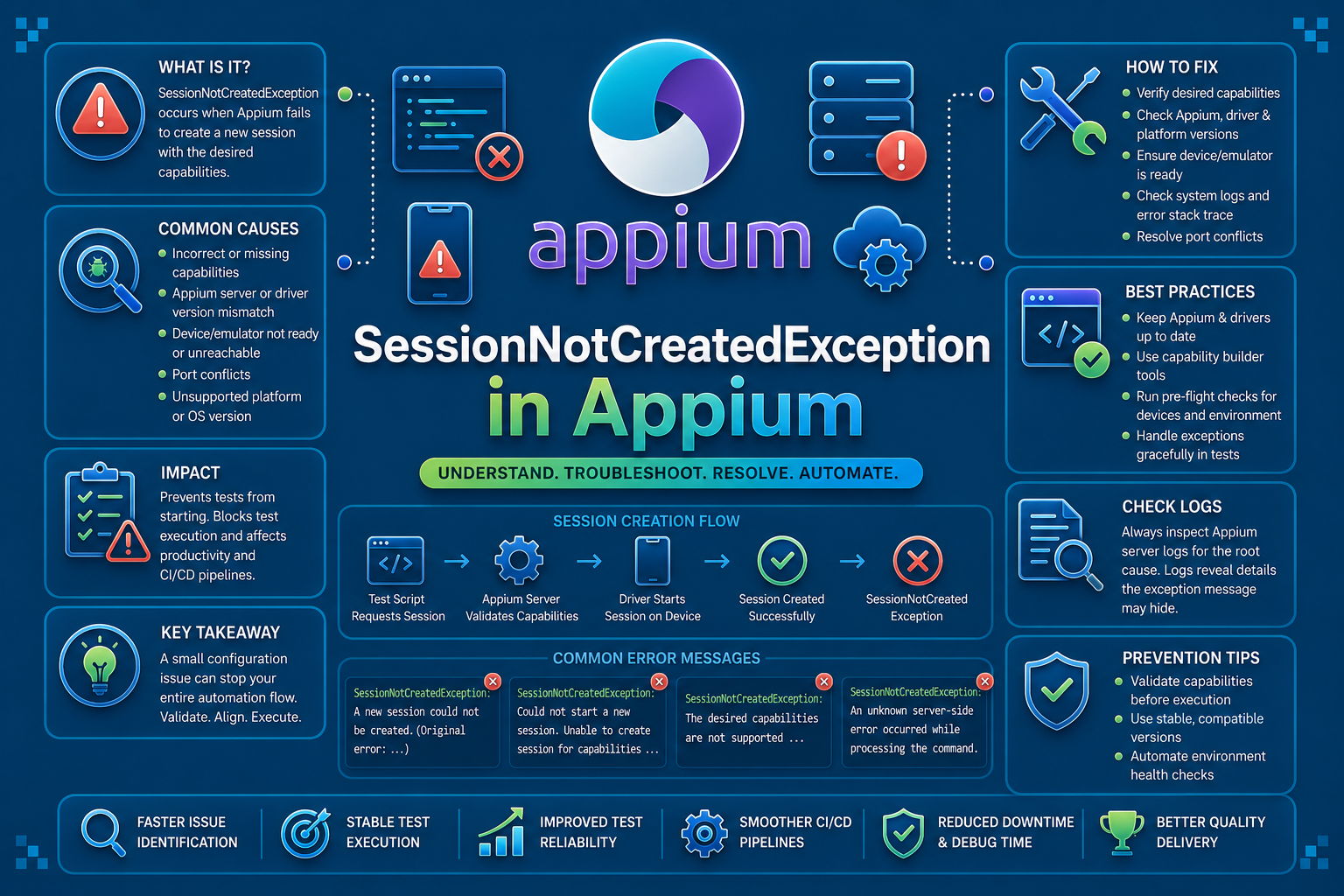

SessionNotCreatedException in Appium is a mobile session startup failure. If you are hitting it on Android or iOS during emulator, simulator, or real-device launch, this guide is for that case, not the Selenium browser version.
The exception usually means Appium could not create a usable automation session for the device, app, or capability set you asked for. In mobile test pipelines, that often points to a capability mismatch, a driver stack issue, an app install problem, or a device that is not ready yet.
What Is SessionNotCreatedException in Appium?
SessionNotCreatedException is thrown when Appium cannot initialize a new test session. The failure happens before the test starts interacting with the app.
That makes it different from locator failures, assertion failures, or stale element problems. Those occur during execution. This one happens at startup.
In practice, the error is a signal that Appium, the driver, the device, and the app do not line up cleanly enough to begin automation. The session may fail on Android, iOS, emulators, simulators, or physical devices.
What Causes SessionNotCreatedException in Appium?
The most common cause is a bad capability set. A typo in platformName, a wrong automationName, an invalid device identifier, or a missing app path can stop the session immediately.
Driver mismatch is another frequent cause. If the Appium server, installed driver, mobile OS runtime, or platform tools are out of sync, the session can fail before the app launches.
Device readiness also matters. A locked phone, a booting emulator, a stale simulator, or a UDID that no longer exists can all trigger the exception.
App-level issues can surface the same way. A broken APK, an unsigned IPA, a bad bundle ID, or an app that cannot install on the target version can block session creation.
Finally, environmental issues can interfere. Port conflicts, stale Appium processes, ADB problems, and parallel jobs targeting the same device are common in CI.
How To Reproduce The Error SessionNotCreatedException
A realistic way to reproduce this error is to point Appium at an invalid app artifact or an unsupported capability set. The session will fail before the first test command runs.
const { remote } = require("webdriverio");

async function main() {
  const driver = await remote({
    protocol: "http",
    hostname: "127.0.0.1",
    port: 4723,
    path: "/wd/hub",
    capabilities: {
      platformName: "Android",
      automationName: "UiAutomator2",
      deviceName: "Pixel_7_API_34",
      app: "/Users/qa/builds/app-release.apk",
      appPackage: "com.example.app",
      appActivity: ".MainActivity"
    }
  });

  console.log(await driver.getSessionId());
  await driver.deleteSession();
}

main().catch(console.error);
If the APK path is wrong, the emulator is offline, or the installed driver does not match the platform, Appium can raise SessionNotCreatedException. On iOS, a wrong bundle ID or signing issue can produce the same outcome.
A typical message might look like this:
SessionNotCreatedException: A new session could not be created.
Original error: Could not launch app. Reason: The app is not installed or cannot be launched.
How To Fix SessionNotCreatedException in Appium
1. Validate Capabilities First
Start with the capability block. This is where most startup failures begin, especially in teams that copy older test configs into new device targets.
Check platformName, automationName, deviceName, udid, and app references. For Android, also verify appPackage and appActivity. For iOS, confirm bundleId and the simulator or device identifier.
const caps = {
  platformName: "Android",
  automationName: "UiAutomator2",
  deviceName: "Pixel_7_API_34",
  app: "/Users/qa/builds/app-release.apk",
  appPackage: "com.example.app",
  appActivity: ".MainActivity"
};
Before running the test, confirm the artifact exists and the target device can actually accept that app. A correct script cannot recover from a missing file or an incompatible build.
2. Match The Driver To The Platform Stack
Appium 2 separates the server from the drivers, so version drift is easier to introduce. A session can fail even when the test code itself is correct.
Check the installed drivers and update the one your platform needs. Then verify the mobile tooling around it, including ADB for Android and Xcode or WebDriverAgent for iOS.
appium driver list --installed
appium driver install uiautomator2
appium driver update uiautomator2
If the driver expects one OS runtime and the device is on another, the session may fail at launch time. Treat the server, driver, and platform tools as one stack.
3. Confirm The Device Is Ready
Appium cannot create a session on a device that is offline, locked, booting, or already in use. This issue shows up often on shared lab devices and in parallel CI runs.
For Android, confirm the emulator or physical device appears in ADB. For iOS, confirm the simulator is booted and the selected runtime exists.
adb devices
adb shell getprop ro.build.version.release

xcrun simctl list devices
xcrun simctl boot "iPhone 15"
If the device is not ready, delay the session start until it is. In CI, this should be a readiness check, not a manual guess.
4. Fix App Install And Signing Problems
When the app cannot install or launch, Appium often reports the problem as a session creation failure. That is common on iOS when signing or bundle IDs are wrong.
On Android, install the APK manually to confirm the artifact is valid. On iOS, verify the app is signed for the target environment and the bundle ID matches the capability set.
adb install -r /Users/qa/builds/app-release.apkconst caps = {
platformName: "iOS",
automationName: "XCUITest",
deviceName: "iPhone 15",
platformVersion: "17.5",
bundleId: "com.example.iosapp"
};If the app installs manually but still fails in Appium, inspect the device logs and the server logs together. The outer error often hides a more specific launch problem.
5. Clean Up Stale Sessions And Ports
Old sessions and port conflicts can block a new launch. This happens frequently when a previous run crashed and did not release the device cleanly.
Always delete the session in a finally block. That keeps the test cleanup predictable, even when the run fails midway.
let driver;

try {
  driver = await remote({ /* capabilities */ });
  // test steps
} finally {
  if (driver) {
    await driver.deleteSession();
  }
}
If the failure persists, restart ADB, the simulator, or the Appium server. Stale state is a common reason the next session cannot start.
adb kill-server
adb start-server
How AI Can Help You Fix SessionNotCreatedException in Appium Faster
Traditional debugging for SessionNotCreatedException is manual and slow. Engineers rerun the job, inspect Appium logs, compare capabilities, and check whether the device or simulator is actually ready.
That process works, but it only starts after the failure has already happened. In mobile pipelines, the real cost is the time spent waiting for a session to fail before the root cause becomes visible.
AI-assisted testing adds a smarter layer before execution. It can inspect the test setup, capability block, and nearby code changes to catch patterns that commonly break session startup, such as an incompatible automationName, a wrong app path, or a device identifier that no longer exists in the lab.
The comparison is simple. Appium tells you the session failed after CI has already spent time provisioning the environment. A code review layer can flag the incompatible capability in the PR diff before the build starts.
That is where Panto AI fits. While Appium surfaces the failure at runtime, Panto AI’s mobile QA and code review layer can flag the underlying setup defect earlier in the workflow and directly in the pull request.
The value is not in replacing Appium. The value is in catching the session-breaking configuration before it becomes a failed run, a blocked pipeline, and another round of manual log hunting.
Best Practices To Prevent SessionNotCreatedException in Appium
Most SessionNotCreatedException failures can be prevented with a few consistency checks across your Appium setup. The goal is to remove drift before the session even starts.
- Centralize capability definitions. Keep the same session settings in one shared place so changes do not drift across test files. This makes it easier to detect bad values before they reach CI.
- Validate app artifacts before execution. Confirm the APK or IPA exists, is the expected build, and matches the target platform. A missing or stale artifact should fail fast, not during session creation.
- Keep Appium, drivers, platform tools, and device images aligned. Version mismatches are a common reason for startup failures. Update the stack together so the server, driver, and runtime stay compatible.
- Use dedicated device allocation for parallel runs. Do not point multiple jobs at the same simulator or physical device unless your infrastructure supports that pattern. Shared devices often create collisions that look like session startup bugs.
- Collect logs from Appium, ADB, and the mobile platform. One log stream rarely gives the full picture. Correlating server logs with device logs usually reveals the root cause much faster.
- Treat session startup failures as configuration defects. Start by checking the test setup, not the app behavior. Most of these failures come from the environment or capability block, not from the application itself.
Handling SessionNotCreatedException In CI/CD Pipelines
CI makes this error more likely because the environment is temporary and time-sensitive. Devices boot more slowly, artifacts may not be present yet, and parallel jobs can compete for the same target.
Make readiness explicit. Confirm the artifact exists, verify the device is reachable, and fail the job before Appium starts if any prerequisite is missing.
test -f build/app-release.apk || exit 1
adb wait-for-device
Conclusion
SessionNotCreatedException is a startup failure, not a test-step failure. In Appium, it usually points to a mismatch in capabilities, device readiness, driver compatibility, or app installability.
The fastest path is to validate the session inputs first, then confirm the platform stack, then inspect device and server logs. In CI, add readiness checks and artifact validation so the failure happens earlier and is easier to diagnose.
For teams running large mobile suites, the goal is not just to fix one session. It is to remove the configuration pattern that keeps creating the same failure again.
FAQs
Q: Does SessionNotCreatedException always mean a capability error?
A: No. Incorrect capabilities are a common cause, but SessionNotCreatedException can also occur because of device state issues, driver-version mismatches, failed app installations, expired certificates, or stale sessions left behind from previous runs.
Q: Why does this error appear in CI but not locally?
A: CI environments often expose issues that never appear on a developer machine, including slower device startup times, missing build artifacts, misconfigured environment variables, parallel device contention, and infrastructure-specific timing problems.
Q: What is the difference between SessionNotCreatedException and WebDriverException in Appium?
A: SessionNotCreatedException indicates that Appium failed to create a valid automation session before test execution began. WebDriverException is a broader category that can occur during session startup or at any point while interacting with the application.
Q: Should I check the device or the app first?
A: Start by validating your desired capabilities and driver configuration, then verify device availability and health, and finally confirm the application build, signing, and installation process. This sequence eliminates the most common causes first and speeds up troubleshooting.



