


Selenium has dominated for two decades with 300+ million daily test executions across 31,854+ organizations globally. Playwright has arrived as a serious contender, growing 235% year-over-year, with adoption surging in enterprise and startups.
The choice between these frameworks directly impacts your CI/CD speed, infrastructure costs, and team productivity.
What Is Selenium?
Selenium is an open-source browser automation framework created in 2004. It started as a tool for automating web application testing and evolved into the industry standard, adopted by companies ranging from early-stage startups to Fortune 500 enterprises.
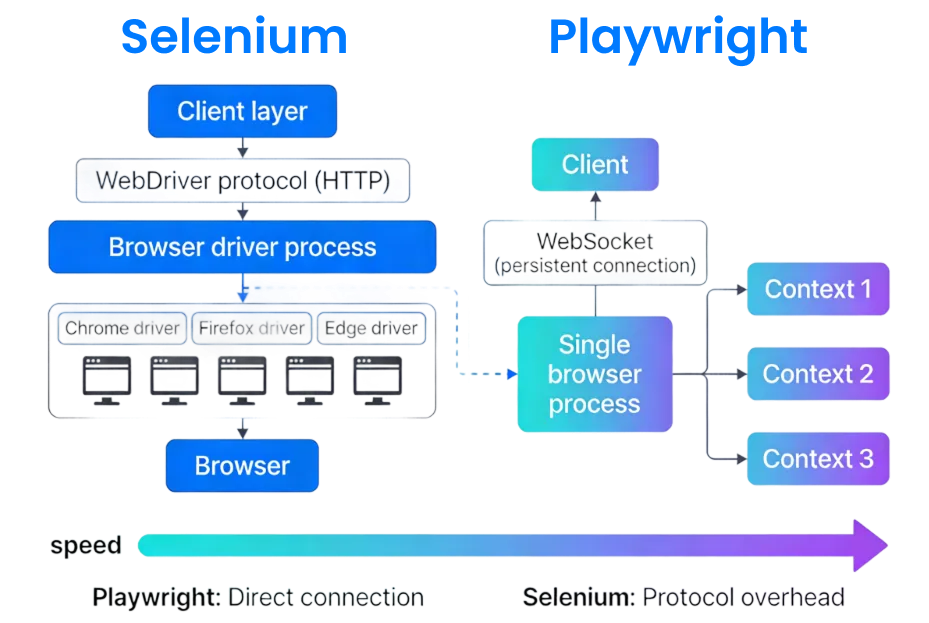
Selenium works by sending commands to a separate browser driver process, which translates those commands into browser actions. You write test code in a coding language, and Selenium’s libraries translate your instructions into WebDriver calls.
The driver process executes those calls in the browser, returns results, and your test script validates the outcome.
This architecture makes Selenium incredibly versatile—it runs on any operating system, supports any browser, and integrates with enterprise infrastructure like Selenium Grid for distributed testing across hundreds of machines.
What Is Playwright?
Playwright is a newer framework created by Microsoft in 2019, specifically designed for modern web applications and native testing. Instead of the WebDriver protocol, Playwright uses WebSocket connections for direct, persistent communication with browsers.
Playwright’s architecture is fundamentally different from Selenium’s layered approach. Instead of sending HTTP requests to a separate driver, Playwright maintains a live connection to the browser and sends events directly through the browser’s own protocol.
Playwright was built from the ground up for modern testing needs: fast feedback loops, parallel execution, intelligent waits, and comprehensive debugging. It supports Chromium, Firefox, and WebKit—covering 95% of global browser usage without needing separate drivers for each browser.
Selenium vs. Playwright: The Market Shift
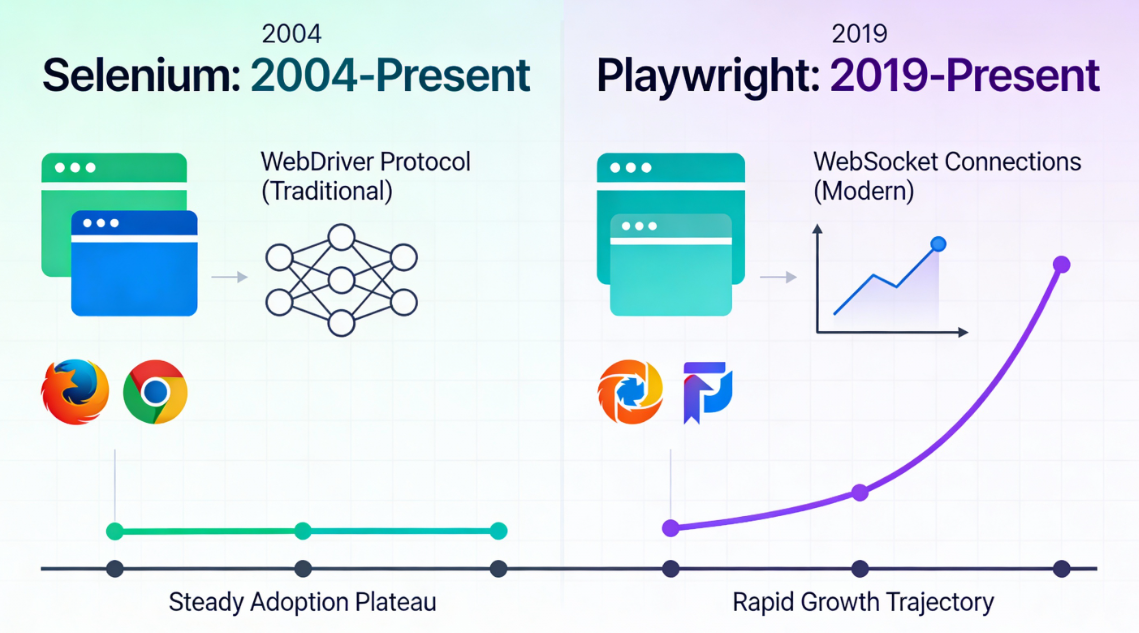
Selenium remains the established leader, but the trend line tells a different story.
Market share data from 2026 shows Selenium’s dominance eroding from 40% to 22% in some regions, while newer frameworks like Playwright and AI-driven QA solutions claim the expanding market.
Playwright’s momentum is undeniable. Weekly npm downloads peaked at 13.5 million in mid-2026, surpassing Cypress for the first time. This reflects a structural shift prioritizing speed and developer experience over legacy compatibility.
Why Speed Matters to Your Bottom Line
Test execution time compounds dramatically across a CI/CD pipeline.
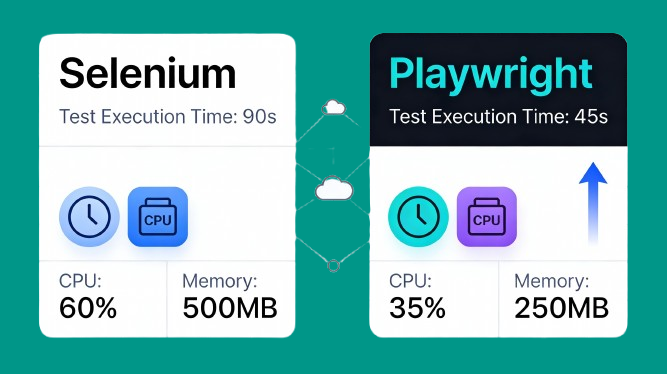
Playwright executes tests 2–3x faster than Selenium, with a single task averaging 290 milliseconds versus Selenium’s 536 milliseconds.
In a pipeline running thousands of tests daily, test suites complete in 30–40 minutes on Playwright versus 60–90 minutes on Selenium.
Over a month, this adds up to dozens of compute hours wasted on slower execution. In cloud environments charging per instance-hour, faster execution directly reduces infrastructure costs by 40–50% for equivalent test coverage.
Core Differences Explained: Selenium vs. Playwright
Architecture: The Foundation of Speed
How Selenium Communicates
Selenium communicates with browsers via HTTP and the WebDriver protocol, requiring separate driver processes for each test.
This introduces latency at initialization, navigation, element interaction, and every action in between. The protocol’s standardization is valuable for enterprise compatibility, but it comes at a speed cost.
How Playwright Communicates
Playwright maintains a persistent WebSocket connection directly to the browser, enabling event-driven, real-time communication.
This is the difference between sending a letter and making a phone call—immediate, bidirectional, and faster. Direct browser access eliminates protocol overhead entirely.
Auto-Wait: Reducing Flakiness by Design
The Flakiness Problem
Flaky tests plague most automation teams, passing locally but failing in CI, wasting engineering time on reruns. Selenium requires explicit wait statements—developers must anticipate every timing issue and code for it manually. This often leads to arms races of progressively longer waits that slow down the entire suite.
Playwright’s Solution
Playwright eliminates this with intelligent auto-wait logic. Before executing any action, Playwright verifies the element is attached to the DOM, visible, stable, receiving pointer events, and enabled. This built-in safety reduces flaky test failures by 60%, according to 2026 benchmarks.
Real Device Testing: Where Each Leads
Selenium’s Strength
Selenium’s strength lies in cloud integration through partnerships with major cloud providers. Selenium executes tests across thousands of real device combinations: actual iPhones, Androids, and desktops in real data centers.
Playwright’s Evolution
Playwright historically relied on device emulation (30+ devices simulated locally), but 2026 brought a major shift. Playwright now supports real device testing through cloud integrations and Android testing via ADB connections.
| Metric | Playwright | Selenium |
|---|---|---|
| Market Share (2026) | 15% (growing fast) | 39% (established leader) |
| Avg Test Execution | 45 seconds | 90 seconds |
| CPU Utilization | 35% | 60% |
| Memory Usage | 250 MB | 500 MB |
| Flaky Test Reduction | 60% | Standard baseline |
| Real Device Support | Android (ADB), iOS (NEW) | Via cloud providers |
Browser Coverage Comparison
Playwright supports Chromium, Firefox, and WebKit—covering approximately 95% of global browser usage. The unified API means one code path tests three browsers without configuration changes. This simplifies cross-browser testing significantly.
Selenium supports Chrome, Firefox, Safari, and others. If your users include legacy browser versions/IE, Selenium is your only option. This breadth is Selenium’s unique advantage for enterprises supporting diverse user bases.
Feature Deep-Dive of Selenium vs. Playwright
What Playwright Does Better
Intelligent Automation
Playwright’s appeal lies in modern, integrated features designed for contemporary web applications. Its auto-wait mechanism intelligently handles timing, eliminating manual sleep() and wait() calls that slow development.
Built-In Parallelization
Parallel execution is built-in to Playwright’s core architecture. Playwright spawns multiple browser contexts within a single process, allowing dozens of concurrent debugging while conserving resources. For large suites in CI/CD, this delivers 75% better efficiency than traditional setups.
Unified Cross-Browser API
The consistent API across Chromium, Firefox, and WebKit simplifies cross-browser work dramatically. One code path tests three browsers without configuration changes or platform-specific logic. This reduces maintenance burden and development time significantly.
What Selenium Does Better
Advanced Browser Control
Selenium 4.35 (released August 2026) brought significant enhancements through Chrome DevTools Protocol support. This enables advanced browser control and performance metrics. BiDi (Bidirectional) API improvements closed gaps in emulation, script execution, and user context management.
Enterprise Infrastructure
The revamped Selenium Grid now supports Docker and Kubernetes natively, IPv6, HTTPS encryption, and modern configuration. For enterprises maintaining distributed on-premise infrastructure across multiple data centers, Selenium Grid remains unmatched.
Legacy Browser Support
Selenium’s debugging capabilities through CDP integration give enterprise teams access to browser internals Playwright doesn’t expose. If you need deep performance metrics, network inspection, or console monitoring during testing, Selenium’s enhanced tooling wins.
| Feature | Playwright | Selenium |
|---|---|---|
| Native Auto-Wait | ✅ Yes | ❌ No |
| Trace Viewer | ✅ Yes | ❌ No |
| CDP Support | Limited | ✅ Yes (v4.35+) |
| Docker/Kubernetes Grid | Conceptual | ✅ Native |
| On-Premise Scaling | Limited | ✅ Robust |
| Legacy Browser Support | ❌ No | ✅ IE & older versions |
| Device Emulation | ✅ 30+ devices | Requires cloud |
| Direct Real Devices | ✅ Android/iOS (NEW) | Via cloud partners |
Choosing between Selenium vs. Playwright
Choose Selenium If:
Legacy Requirements
- Your organization relies on legacy browser support (IE, older Chrome/Firefox versions) and needs compatibility across dozens of browser versions.
- This is critical for financial institutions, government agencies, and enterprises supporting diverse user bases.
- If your user base includes IE or unsupported browser versions, Selenium is non-negotiable.
Existing Infrastructure
- If your team is primarily Java-based benefiting from TestNG, JUnit, and existing enterprise frameworks, the sunk investment makes Selenium’s ecosystem valuable.
- Real device cloud infrastructure already contracted with BrowserStack, LambdaTest, or Sauce Labs
- Selenium’s seamless integration eliminates friction and training overhead.
Choose Playwright If:
Modern Stack
- You’re building greenfield automation for modern web applications targeting Chrome, Firefox, and Safari.
- Your CI/CD pipeline is cost-sensitive—every minute of faster execution compounds into monthly savings.
- Your team values developer productivity; Playwright’s auto-wait and Trace Viewer reduce debugging time.
Cloud-Native Infrastructure
- Running containerized infrastructure (Kubernetes, AWS ECS, Google Cloud Run)
- Playwright’s resource efficiency and built-in parallelization align perfectly with cloud-native architectures.
- For startups scaling rapidly, simpler setup and faster execution reduce infrastructure costs.
The Hybrid Approach
The best teams layer both tools strategically. Use Playwright for unit/integration test automation with fast feedback and high coverage. Use Selenium for real device validation and legacy browser compatibility testing.
This approach splits test responsibilities by risk profile and execution environment.
New test scenarios go on Playwright; legacy requirement coverage stays on Selenium.
Performance Metrics of Selenium vs. Playwright at a Glance
A 500-test suite illustrates the gap clearly. On Selenium, this runs in 60–90 minutes locally or distributed across a Grid. The same suite on Playwright, leveraging built-in parallelization, completes in 30–40 minutes—a 50% reduction in execution time.
In cloud environments, that’s 40–50% lower monthly bills for equivalent test coverage. The auto-wait mechanism also impacts stability—Playwright’s intelligent waits reduce flaky failures by 60%.
| Category | Playwright | Selenium |
|---|---|---|
| Growth Rate (YoY) | 235% | Stable, mature |
| Market Share | 15% (rising) | 39% (declining) |
| Weekly npm Downloads | 3.2–13.5M | N/A (not on npm) |
| Organizations Using | Growing rapidly | 31,854+ established |
| Test Execution Speed | 290ms per action | 536ms per action |
| Resource Consumption | 250MB / 35% CPU | 500MB / 60% CPU |
| Flaky Test Rate Reduction | 60% improvement | Manual optimizations |
The Future of QA Automation: Panto AI
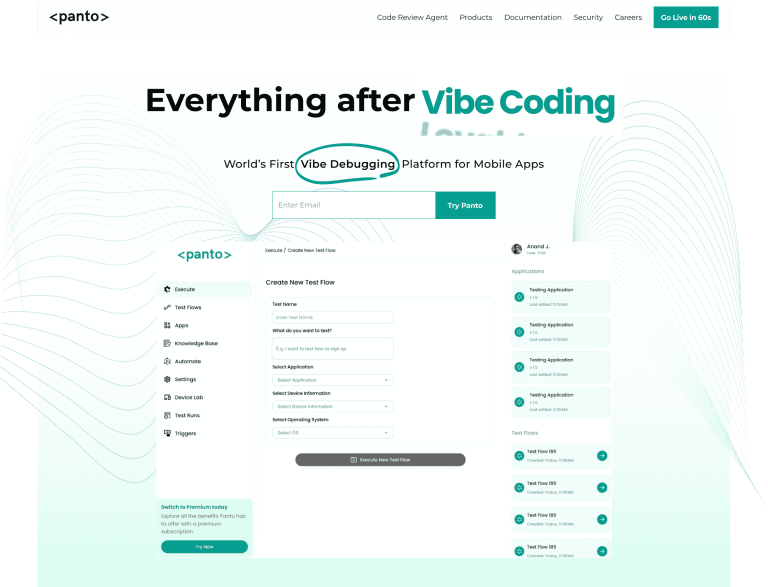
Panto AI takes a fundamentally different approach by automating the test creation process itself. Instead of engineers writing tests line-by-line, Panto AI analyzes your codebase, understands your application logic, and generates test cases intelligently.
Key Advantages Over Traditional Frameworks
Instant Test Generation
With Selenium or Playwright, creating a test suite for a new feature takes days or weeks of manual work. Panto AI generates test cases in minutes by analyzing your code and suggesting comprehensive coverage automatically.
Intelligent Test Maintenance
When your code changes, Playwright and Selenium tests break—requiring manual fixes for each locator or assertion. Panto AI’s context-aware debugging understands your code changes and updates tests automatically, reducing maintenance overhead by 70%.
Zero Test Code Learning Curve
New team members must learn Selenium’s WebDriver API or Playwright’s syntax before writing their first test. Panto AI abstracts away the framework complexity; codeless automation allows engineers describe what to test, not how to test it.
When to Use Panto AI vs. Selenium/Playwright
Panto AI isn’t a replacement for Playwright or Selenium—it’s a layer above them.
For test creation and maintenance, Panto AI accelerates your team by 5–10x through AI-powered automation.
The ideal 2026 stack combines Panto AI for AI test case generation and maintenance with Playwright for fast execution on modern browsers. Add Selenium Grid when you need legacy browser coverage or on-premise distributed testing.
This three-tier approach captures the strengths of all three: AI intelligence, modern speed, and enterprise scale.
| Aspect | Selenium | Playwright | Panto AI |
|---|---|---|---|
| Test Creation | Manual coding | Manual coding | AI-generated |
| Maintenance | Manual updates | Manual updates | Auto-updating |
| Learning Curve | Steep | Moderate | Minimal |
| Execution Speed | Slower | Fast | Framework-agnostic |
| Framework Abstraction | Low-level | Mid-level | High-level AI |
| Team Productivity | Developer-focused | Developer-focused | Organization-wide |
| Time to Coverage | Weeks/months | Weeks | Days/hours |
Migration Path: If You’re Considering the Switch
Planning Your Migration
Migrating existing Selenium suites to Playwright is feasible but requires planning.
Selenium’s page-object model patterns transfer directly; Playwright’s similar architecture makes refactoring straightforward.
Staged Rollout Strategy
Start by writing new debugging scenarios on Playwright while maintaining existing Selenium tests. This parallel approach validates Playwright’s fit without immediate risk or disruption.
Once your team is confident, systematically migrate high-value, frequently-executed tests for maximum ROI.
The Verdict
Playwright dominates for speed and modern development workflows; Selenium remains unmatched for enterprise scale and legacy browser support. The choice between them depends entirely on your application stack, team expertise, and business requirements.
But the choice itself reveals a deeper reality about test automation in 2026.
You’re not choosing between Selenium vs. Playwright—you’re choosing how to build a sustainable debugging strategy as your codebase and team grow.
Whether you pick Playwright or Selenium, you’ll still face the same fundamental challenge: writing and maintaining thousands of test cases manually as your product evolves.
Panto AI addresses this by automating test generation and maintenance, letting you build comprehensive coverage without the engineering overhead.
In 2026, picking a testing framework is just the beginning. Building a testing practice that keeps pace with your development velocity is what separates scaling teams from those perpetually playing catch-up.



